3-2-1 backup, and why the only copy you have doesn't count
Everyone I meet has a backup. When I ask when it was last tested, the room goes quiet.
That isn't carelessness. Backup is one of the few things in IT where you never get confirmation that it works until the day it is too late. Until then a broken backup looks exactly like a working one. Same green tick, same email every night, same feeling that it is taken care of.
The 3-2-1 rule exists to make that difference visible in advance.
The rule
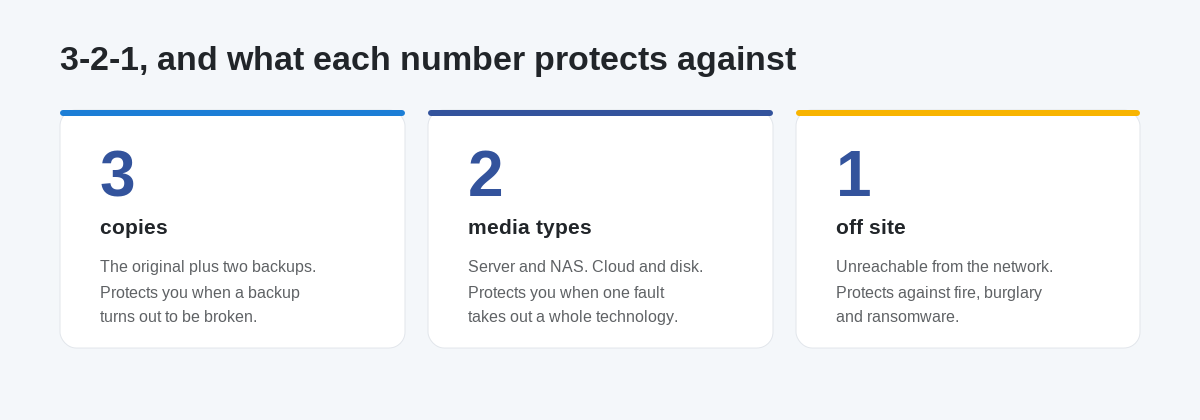
Three copies of the data. The original plus two backups.
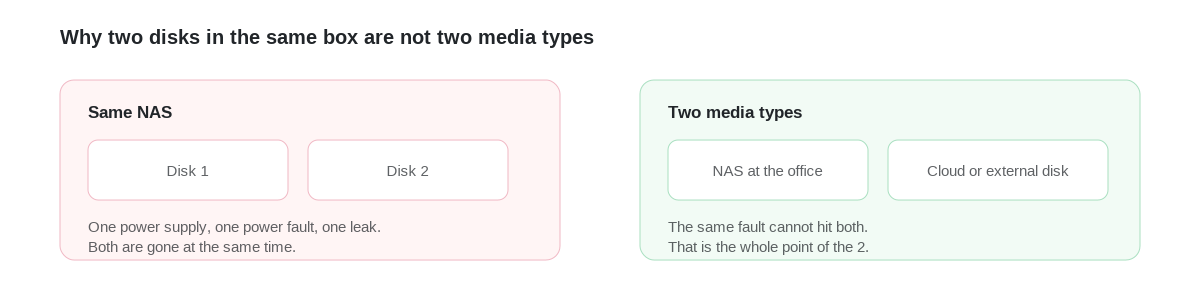
On two different media types. The server and a NAS. The cloud and an external disk. The point is that the same fault should not be able to take out both.
One of them in another location. Outside the premises, outside the fire compartment, and preferably out of reach of whatever hits the office.
The rule has been around for almost twenty years and still holds, because it describes risks and no products. It works as well on an accounting program from 1998 as on Microsoft 365.
What each number protects against
Three copies protect you when a backup turns out to be broken. That happens more often than people think, and it is almost always discovered during a restore, the moment you least want a surprise.
Two media types protect you when a fault hits an entire technology.
One copy in another location protects against fire, burglary, a water leak, and against ransomware that deliberately hunts down and encrypts network-connected backups before it goes for the server. The last one is the most common cause today, and it is also why the wording has been tightened over the years. A copy that sits somewhere else is not enough. It has to be unreachable from the network.
What makes ransomware a problem of its own
Traditional backup assumes that data disappears. Ransomware assumes that the data is still there but unreadable, and that the attacker has had time to look around first.
That matters in two ways. Modern attacks actively look for backups and encrypt them first, because a working backup is the only thing that keeps the victim from paying. And they often sit in the system for weeks before they strike, which means your most recent backups may contain the attacker.
So one copy off site is not enough. You also need to be able to go back further than a few days, and the copy has to be write-protected or in some other way out of reach for anyone who is inside the network.
Microsoft 365 is not a backup
This is the most common misunderstanding we meet.
Microsoft is responsible for the service working, not for your content. If something is deleted and its time in the recycle bin runs out, it is gone. If ransomware encrypts the files in your OneDrive, the encrypted files sync up to the cloud. Sync does not tell good changes from bad ones.
The recycle bin and version history help against mistakes, as we went through in the Microsoft 365 series, and they are excellent at that. But they have fixed time windows, they cannot be locked against an attacker who got in with the right password, and they do not cover everything.
What the backup should cover
Once you write it down, the list gets longer than most people expected.
The files are the obvious part. Then comes email, which is often forgotten because it feels like a service rather than data. After that the accounting system, which may sit with a vendor whose own routines nobody at your company has read. Last comes what is not data at all: the firewall configuration, the settings in your systems, the list of which accounts exist.
Write the list before you choose a tool. Otherwise you buy a solution that covers what you had already thought of.
Two numbers that decide the rest
Decide how much you can afford to lose and how long you can afford to stand still. Answer in hours.
Those two answers decide everything else. If you can lose a working day, a nightly backup is enough. If you can lose one hour, you need something entirely different. If you can stand still for three days, you can restore from an external disk. If you can stand still for four hours, you need to have tested exactly how it is done.
Most companies have never set the numbers, and so they buy a backup that is either too expensive or too slow, without knowing which.
Three mistakes we see over and over
The backup runs with the same login as everything else. If someone gets into that account they reach both the data and the backup. The backup should have its own credentials that nobody uses for anything else.
Nobody reads the emails from the backup system. They arrive every night and eventually nobody reads them. The night it says "failed", nobody sees it. One client had nine months of broken backups, with a daily report in the inbox the whole time.
Nobody knows how the restore is done. There is a backup, but the person who set it up has left. Write the steps down, on paper, and put them where someone will find them when the systems are down.
Next step
The short practical walkthrough of how to set it up is in the guide The 3-2-1 backup rule, explained simply.
And do one thing this week: restore a file from your backup. Not the whole system, just one file.
It takes ten minutes and is the difference between having a backup and believing you have one. Then set a reminder to do it again every quarter, because a backup that worked in March says nothing about October.
Next part: passwords, and why choosing a good one doesn't help if it is used in ten places.
Other parts in this series:
- 3-2-1 backup (this article)
- Password managers
- MFA
- Phishing
- Suspicious link
- Old user accounts
- When an employee leaves
- Admin accounts