Phishing, what the emails that really fool people look like
The picture of phishing is stuck in 2010: a Nigerian prince, spelling mistakes, a sender that is obviously not the bank. That kind of email still exists, and it catches almost nobody.
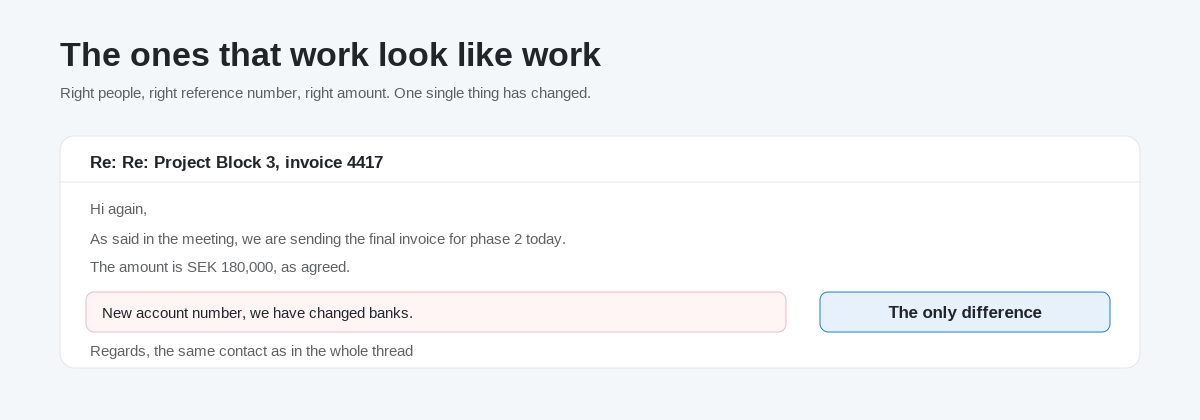
The ones that work look like work.
What a good attack looks like
An email from a colleague, with the right signature, who writes "can you look at this before the meeting" and includes a link. A reminder about an invoice from a vendor you really use. A message from Microsoft saying the password is about to expire, with the correct logo, landing on a Tuesday morning when the inbox is full.
No spelling mistakes and no odd tone. The context is what gives them away, and you rarely have time to think about that when you are in a hurry.
One thing recurs in almost all of them: they create a reason to act now. The account closes tomorrow, the invoice is due today, the boss is in a meeting and needs an answer right away. The time pressure is the method.
Why AI made them harder
The advice that held for ten years, look for bad Swedish, no longer works.
Language models write flawless Swedish in seconds, in any tone. That does not mean the attacks have become more advanced technically, only that the last easy tell is gone. What is left to rely on is the context: was I expecting this, from this person, right now?
Targeted attacks on small companies
The most dangerous ones are the emails written for you specifically, not the mass mailings.
A common variant: someone gets into a vendor's email, reads the thread about an ongoing project, and replies in the middle of the conversation with new bank details. Right people, right reference number, right amount, right tone. The only difference is the account number.
We have seen it at a client in the construction industry. The invoice was for SEK 180,000 and it was paid without anyone reacting, because everything else was right. It was discovered three weeks later when the real vendor called and asked where the money was. The attacker had been sitting in the vendor's inbox for several weeks, reading until they knew how the project talked.
The break-in happened at the vendor, not at the client. Your own security does not protect you when someone else's email gets hijacked, and that is why the routine below is needed.
This helps
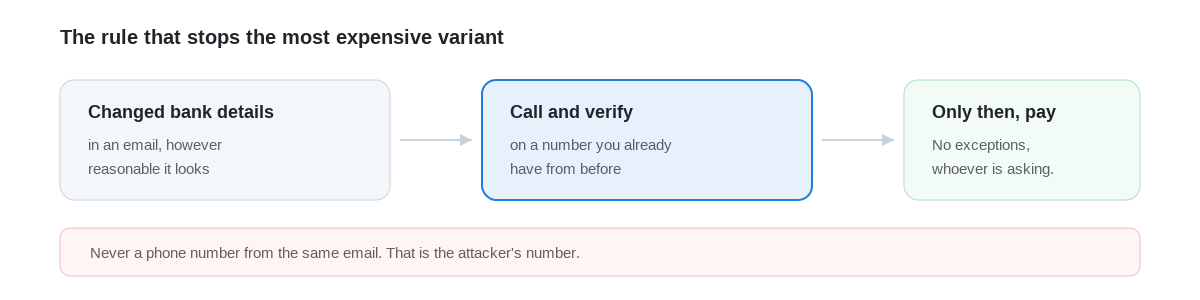
A rule about payments. Changed bank details are always verified by phone, on a number you already have, never a number from the email. No exceptions, whoever is asking. With a rule, nobody has to make a judgement call under pressure.
That it is okay to ask. Most people who click had a feeling that something was off, but did not want to be the one who bothered someone. A company where it is easy to walk over and ask "does this look right?" catches more attacks than any technical filter.
MFA turned on, so a leaked password is not enough.
SPF, DKIM and DMARC on your domain, so nobody can send email that appears to come from you. It protects your customers from being fooled in your name. It does not protect your own inbox.
CEO fraud, the simplest variant
It requires no technology at all and hits small companies more often than large ones.
A short email from the owner to whoever handles the finances: "In a meeting, can you arrange an urgent payment, will get back with details." No link, no attachment, nothing for a filter to catch. Only a sender address that resembles the real one and a tone that makes you want to be helpful.
It works because it exploits hierarchy and time pressure at the same time. The person who gets the email does not want to be slow with the boss.
The remedy is the same rule as above: every payment outside the ordinary is verified verbally, and that applies even when the owner is the one asking. Tell your finance people, so they know they have the mandate to ask.
The technical things worth doing
Turn on the external sender banner in Microsoft 365. A small line at the top saying the email comes from outside does more good than you would think, especially against the variant where someone pretends to be a colleague.
Also check that nobody has added a forwarding rule you do not know about. It is the first thing an attacker does after getting into an inbox, because it gives them continued insight even after a password change.
Practise instead of informing
A walkthrough at a meeting is forgotten in a week. What sticks is having seen a real example.
Save the phishing emails you really get and show them to the staff, with the sender address visible. Your own examples always beat generic ones, because they are about vendors and systems everyone recognises.
Simulated phishing tests exist as a service and they work, but only if the result is used to learn and not to single people out. A test where the person who clicks gets told off does more harm than good, for exactly the reason given in the next section.
Don't tell off the person who clicks
A company where you get told off is a company where people hide that they clicked, and the hours between the click and the report are exactly the hours that decide how bad it gets. The person who tells you right away is doing you a favour, even if they made a mistake.
Say it out loud, in advance, while nothing has happened. Then people believe it when it counts.
Next part: suspicious link, how to check it without clicking.
Other parts in this series:
- 3-2-1 backup
- Password managers
- MFA
- Phishing (this article)
- Suspicious link
- Old user accounts
- When an employee leaves
- Admin accounts