Password managers, and why good passwords aren't enough
The advice on passwords has been wrong for twenty years, and most people still follow it.
Upper and lower case, a digit, a special character, change every ninety days. The passwords did not get safer. They became Summer2024!, which was changed to Summer2025! and written on a note under the keyboard.
The rules were written to stop someone sitting there guessing. That is no longer how it happens.
The real threat
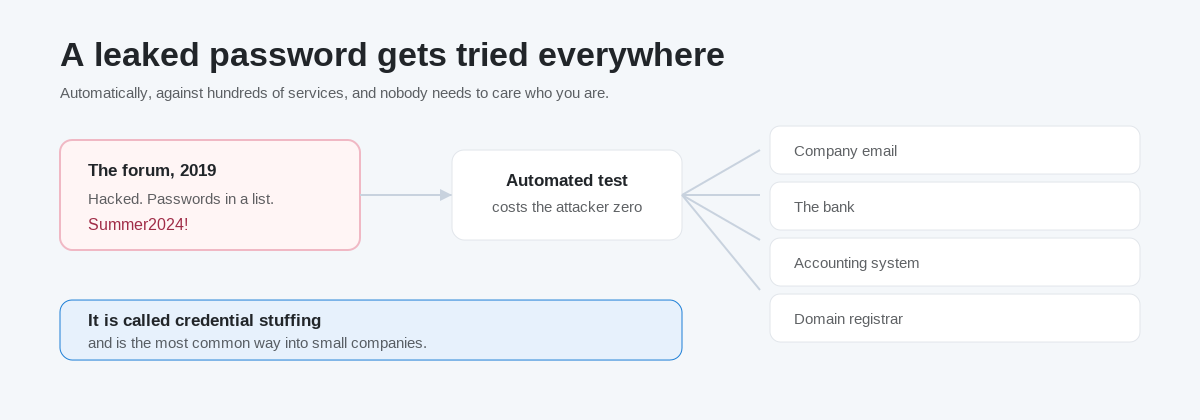
Attackers rarely guess passwords. They try passwords that have already leaked.
When a website gets hacked, usernames and passwords end up in lists that are sold on. Then the combinations are tested automatically against hundreds of other services. If someone at your company used the same password for their account on a forum in 2019 as for the company email today, it does not matter how complicated it is.
It is called credential stuffing and it is the most common way into small companies. The method is simple. It is fully automated, costs the attacker almost nothing and succeeds often enough.
You can check whether your addresses appear in known leaks at haveibeenpwned.com. It is free and takes two minutes, and it tends to make the discussion a lot shorter.
Why a password manager solves it
Nobody can remember fifty unique passwords. Nobody manages it, and that is why people reuse their passwords. Every rule that depends on people remembering more things will be worked around.
A password manager removes the need. It creates a unique password per service, stores it encrypted, and fills it in for you. You need to remember exactly one password, the one for the vault.
The automatic fill has one more advantage: it does not fill in on the wrong site. If the address is not exactly right, nothing happens, which makes it a surprisingly good protection against phishing. Where a human reads carelessly, the program reads exactly.
The objection we always get
"Isn't it dangerous to put all your eggs in one basket?"
Yes, if the basket is bad. But compare with how things look today: the same password everywhere, in an Excel file called Passwords, on notes, in the browser's memory on a computer that five people use.
A vault with a long unique master password and MFA turned on is much better than that. Serious password managers also encrypt locally, which means the vendor cannot read the contents even if they get hacked themselves. That has happened. When LastPass lost its customers' vaults in 2022, vaults with long master passwords held, but some vaults with weak master passwords have been cracked since. It is the master password that holds.
The master password is the only part that asks something of you
Since it is the only one you need to remember, it can be long.
Three or four random words work better than something short and fiddly. It is easy to type on a phone and hard to guess. Avoid quotes, song lyrics and pet names, anything that can be traced back to you.
Write it down once, on paper, and put it where you keep your important documents. It sounds backwards but it is right: the risk that someone breaks into your home to read a note is much smaller than the risk that you forget the password and lock yourself out of everything.
Which one you choose matters less than choosing one
The established options are good enough for a small company. The differences are in price and interface. The security is basically the same.
Two things are worth looking for, though. A business version with shared vaults lets you share the wifi password or the login to a common service without sending it in a chat. And a clear way out, meaning export, so you are not stuck if you want to switch.
The browser's built-in password manager is better than nothing and better than reuse. It is worse at sharing between people and at following you across different devices and browsers.
What happens when someone leaves
A password manager solves a problem that is otherwise uncomfortable: one person carrying around logins nobody else knows about.
With shared vaults, the company's logins stay with the company. When someone leaves you remove their access to the vault, and you know exactly which passwords need changing, namely the ones in the vaults that person had access to.
Without a vault the answer to the same question is a guess, and that guess usually ends with nothing being changed at all. This ties in with When an employee leaves, where the unknown logins are exactly what creates the work.
What to do with passwords that still have to be shared
There are always a few that several people need: wifi, a shared customer portal, an account with a vendor that does not support multiple users.
Put them in a shared vault, not in a chat and not in a document. A password sent in a Teams chat stays in that chat forever, searchable, for everyone who is in the channel now or later.
If you need to send a password to someone outside the company, use a one-time link that expires after it has been opened. Most password managers have that feature built in.
Get started
The guide Password managers: stop reusing passwords covers the choice of tool and the first steps.
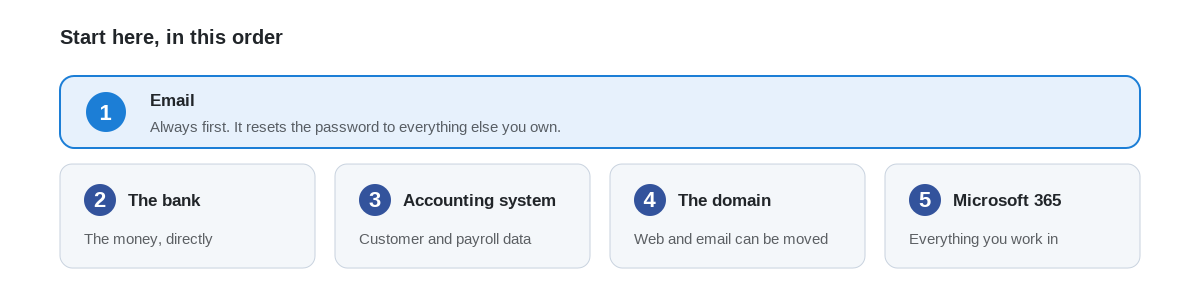
Don't try to move everything in at once. Take the five most important ones, change them to new unique passwords while you are at it, and then add the rest as you log in to things anyway.
After a couple of weeks the vault is full and nobody had to set aside a day for it.
Next part: MFA, the one single protection that stops almost all of these attacks.
Other parts in this series:
- 3-2-1 backup
- Password managers (this article)
- MFA
- Phishing
- Suspicious link
- Old user accounts
- When an employee leaves
- Admin accounts