How to share a file safely
Most people still send files as attachments. Usually that goes fine. You notice it when something has gone wrong.
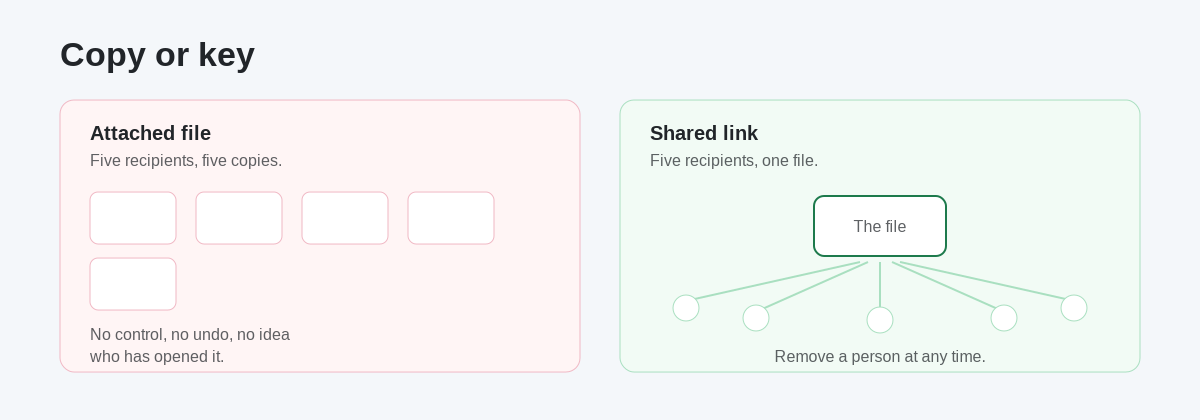
An attachment is a copy. Once you have hit Send you have no control over it any more. You cannot see who has opened it and you cannot take it back. If you find an error in the document, the faulty version is still sitting in the recipient's inbox. Send it to five people and there are five copies, and they start changing in different directions as soon as someone opens theirs.
A shared link works differently. The file stays with you, and the link only gives access to it.
The copies cost more than you think
Storage space is rarely the problem. The problem is that nobody knows which version counts.
This is how it usually goes. Someone emails out a document. Two people reply, each with their own corrected version. A third keeps working in the original, because the replies never reached them. Now there are four documents and nobody knows which one is right. The time goes into comparing versions instead of writing.
With a shared link there is only one file. Everyone edits the same document, and the version history shows who changed what. We go through that in How to restore an old version.
How to share
Right-click the file in OneDrive, Teams or SharePoint and choose Share. Then comes the step most people click past: the box showing who the link works for.
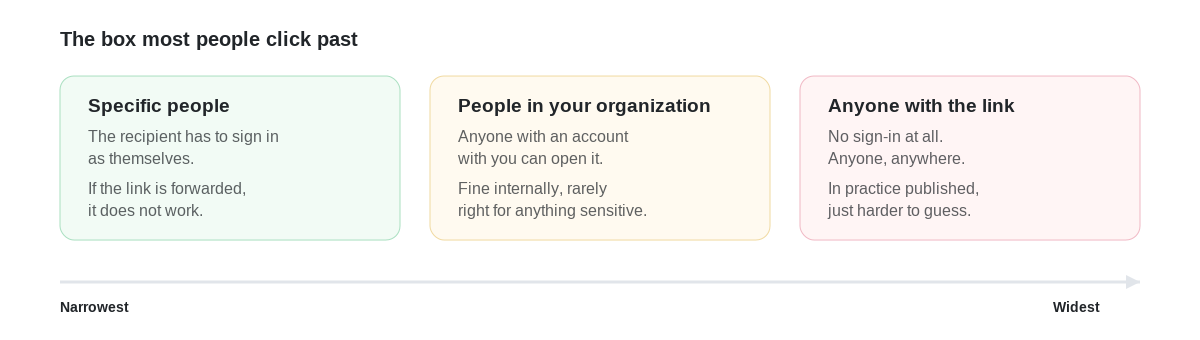
Click that box before you send. It takes a few seconds, and that is where you decide who can actually get to the file.
Three things to set before you send
Choose Specific people if the file is sensitive. The recipient then has to sign in with their own account. If the link is forwarded, it does not work for anyone else. It is the only option where you know exactly who can open the file.
Turn off editing if the recipient only needs to read. "Allow editing" is usually ticked from the start. At one customer, a subcontractor made changes in the price list. No malice, they thought it was their own document. Nobody noticed until a quote went out with the wrong prices.
Set an expiry date on anything temporary. If the tender closes on the 15th, the link can stop working on the 16th. Then nobody has to remember to clean up, and the list of old shares stops growing.
A share lives until someone removes it
An attachment does nothing. It sits in an old inbox until someone digs it out.
A shared link keeps working, and it always shows the file as it looks right now. It only stops working when someone removes it.
So if you shared a folder with a consultant in March, the consultant sees the folder as it looks today. If files have been added since then they see those too, because the permission covers everything in the folder.
Share anyway. But set an expiry date, and go through the list a couple of times a year.
What the recipient notices
The most common objection is that it gets more awkward for the recipient. Sometimes that is true.
An external recipient without a Microsoft account gets a one-time code sent to their email. It takes twenty seconds, but it is one more step. A colleague notices nothing, the file opens straight away.
I think the extra step is worth it for everything except plain information sheets, the kind of thing that could just as well have been out in the open.
What you get back
When you share instead of attaching, you can see who has access, and you can remove a person at any time. There is only one version of the file, so nobody has to ask which one is the latest.
And the day someone sends the wrong document to the wrong customer, you can close the link before the customer has had time to open it. With an attachment you cannot. It stays in the customer's inbox, and all you can do is email them and ask them to delete it.
Sometimes it should be an attachment
A signed contract must not be changeable afterwards, so it should be sent as a fixed copy. The same goes for an invoice or a document for a public authority.
The rule of thumb: share what is still changing, attach what is finished.
Start here
Next time you are about to attach something, share it instead. Once is enough to see how it works.
Then go through what you have already shared, with the help of How to see who has access to a file. All the quick shares made over the years show up there.
Next part: what "Anyone with the link" actually means, and why it is more dangerous than it sounds.
Other parts in this series:
- Where should I save the file?
- How to share a file safely (this article)
- "Anyone with the link", what does it mean?
- How to restore a deleted file
- How to restore an old version
- How to see who has access to a file